Overcast Solution Architecture: A Salesforce-native app
Overcast was designed for solving the unique task of integrating highly-complex enterprise software solutions such as SAP. Today, Overcast is the only solution that allows for application integrations with no footprint on the backend system. Our ready-to-use Components provide users with a running start to begin synchronizing data to and from on-premise systems, providing an out-of-the-box solution on a familiar Salesforce User Interface.
Integration with Overcast has become a low to no-code matter, removing complexity so it's easy to master for Salesforce Admins. A variety of Integrations are possible on data, process and UI layers, such as User Interface mashups that integrate backend data in Salesforce UIs, Real-Time Integrations that connect business processes across applications, and Data Synchronizations which allow for replicating data to and from Salesforce. This Overcast hybrid architecture of real-time data access combined with data synchronizations significantly reduces integration complexity and risk: otherwise, the more data you replicate, the more business logic you are forced to replicate as well and with that comes complexity.
.gif?Policy=eyJTdGF0ZW1lbnQiOlt7IlJlc291cmNlIjoiaHR0cHM6Ly9kemY4dnF2MjRlcWhnLmNsb3VkZnJvbnQubmV0L3VzZXJmaWxlcy83NDg4LzMyMTM5L2NrZmluZGVyL2ltYWdlcy90ZWNoLWFuaTItMigzKS5naWYiLCJDb25kaXRpb24iOnsiRGF0ZUxlc3NUaGFuIjp7IkFXUzpFcG9jaFRpbWUiOjE3ODI1NzA5Mzd9fX1dfQ__&Signature=bvefe8Il2vp~XxXJKab~YGxfJlA5vVZdoPzYPSNZzKusxeHi~W2oYHQjEYxjp5ftn7k3xW41lUw8HZIzcLrbAhAnBUuJbhWGjR8em0zm4Eb9t7quaL0wIuN8EnVpt6w~LgiEQuTYgzmjamyUstuhC3Z9aQFVGAQQhskgdTDs43JLg4UwB4r66rT8meXYR837ESTqA-iD9iLoCQrXgZ~e8qtk9LIRzlKRI5HjL6kh1s0DyoG~i0AMcMC2G~Yt-DDvjp4SKTARbrrmZdpjG8okgKfucI6u6N734AJ9Iklc1ZqIGsheijOjgyVixRbdEDWQk~UQvIfPr9hgrHux2ecOtw__&Key-Pair-Id=K2TK3EG287XSFC)
| 1 | Salesforce and SAP data are seamlessly unified for Salesforce Admins and end users alike to easily understand and analyze. |
| 2 | Edit & create SAP Sales Orders in real-time from a mobile device or desktop. |
| 3 | Out-of-the-box Components display SAP data in a matter of minutes, providing a true reflection of real time information. |
| 4 | Build custom Salesforce Lightning Components or native mobile application UI on top of Overcast. |
| 5 | Overcast Integration amplifies the Salesforce frontend via APIs and using the user mapping / SSO to SAP enhances data in Salesforce. |
| 6 | Fulfill all data synchronization needs by replicating data to and from any API, database or Web service. |
| 7 | Directly consume 30,000+ APIs in SAP ERP or S/4HANA “as is” without any backend work required. Our USP can also read from any table or view and integrate any other system via any web service. |
| 8 | When there are no clean APIs or Microservices yet available, optionally connect via Mulesoft or SAP CPI that provides & manages APIs to be readily consumed. |
Overcast Components
Upon intense analysis, we created our Components to fit 80%+ of our typical customer integrations out of the box, so they're ready to use within a few hours. Created with the Salesforce Lightning App Builder in mind, our Components display Salesforce data and SAP data seamlessly, side by side. Your data is retrieved in real-time from SAP, and never stored in Salesforce, so it does not count against your storage limits.
The Overcast Component Library houses our native Components ready for you to activate, according to your needs. Choose from a variety of capabilities, ranging from display or create/update Components to Data Synchronization or Salesforce/SAP mashup Components. You also have the option to create your own Custom Components, or have our talented team create one to fit your needs.
Use the Overcast Real-Time Data Viewer to display your entire API on one screen, which results in reduced clicks and more efficient navigation for your users.
.png?Policy=eyJTdGF0ZW1lbnQiOlt7IlJlc291cmNlIjoiaHR0cHM6Ly9kemY4dnF2MjRlcWhnLmNsb3VkZnJvbnQubmV0L3VzZXJmaWxlcy83NDg4LzMyMTM5L2NrZmluZGVyL2ltYWdlcy9pbWFnZSgxNjUpLnBuZyIsIkNvbmRpdGlvbiI6eyJEYXRlTGVzc1RoYW4iOnsiQVdTOkVwb2NoVGltZSI6MTc4MjU3MDkzN319fV19&Signature=ZSfD2Vh1qK-5dFJG8n3vdbae88622q~Ic7UpMtI-yHbYtfeet8VYo~b0fsTc1C7Lkay0idQY1gXWx5-9-dPi0CIalSEkVFooQ4e7895BlhhGy7VDFREujLsYunNaOpZxVR-kuzbjJJPJkrAk3BliVIL23dCxPUHZ86~NoBuftM88v7t2r28O5Qr6ItXVcSRl~eGoQy9ZyxMTG-meODzWGVhhDrnMWohpSaXyEdBVtkRyNM5MwyVuaeySxHoA24mHfpEkE6Jq6gVDoZ804kynSk7xFCMvmrvkxJCkBtV0XOy9Kumm4nIk~~vRlGaY0qxwrp-wfAwTCHj2VWJwevm-CA__&Key-Pair-Id=K2TK3EG287XSFC)
- Simple and ready to use, with drag-and-drop functionality for Salesforce Lightning App Builder
- Pre-Integrated and works with SAP out of the box
- No SAP work required and code is only needed if it enhances a Custom Component you choose to create
- Synchronize and visualize your SAP and other on-premise data in Salesforce
- Ideal for use in Sales Cloud, Service Cloud, Communities, and in the Salesforce Mobile App
- Install and connect to your SAP ERP within a few hours
Overcast Integration Scenarios
.png?Policy=eyJTdGF0ZW1lbnQiOlt7IlJlc291cmNlIjoiaHR0cHM6Ly9kemY4dnF2MjRlcWhnLmNsb3VkZnJvbnQubmV0L3VzZXJmaWxlcy83NDg4LzMyMTM5L2NrZmluZGVyL2ltYWdlcy9pbWFnZSgxNjYpLnBuZyIsIkNvbmRpdGlvbiI6eyJEYXRlTGVzc1RoYW4iOnsiQVdTOkVwb2NoVGltZSI6MTc4MjU3MDkzN319fV19&Signature=XFGK33hXlquXU47kxzYWdXNaWJaSAtVFvckyQO-tYezdJ-YucvOXlEwyKCVvPxXmVAWcsejSllyf3UuZfBRsg7In~pjp41Sw3EK2NW18NQ7-10ArHSkvlJyVYrbe21ESoKwuBEp6Xi9Qjn26znkGtRLpRrrKMvHuezNFtF9N-bUn1YyqSmMprHgb4n-0me3U1SAnaRNxuTlvVYelnUEu-YJN68-iuQSkbYSgFLNzXEqNolCMR0YnvquhYzCrNis79HWy0EplZHEyO8ntg~EJ7T064ckwWlFdBG5Rg13-bAj3lDjXfUShZ2lBllhp87yrHXFEENPkzinblv8dVLj7ng__&Key-Pair-Id=K2TK3EG287XSFC) Integration Scenarios allow for connecting your backend system to Salesforce. One scenario houses all of the parts necessary for a seamless integration, including Connection Strings, the Integration Record Type, API or Data Table for Connecting, Data Mappings, Job Execution Schedules, and Log Levels. This makes it easy to access data in your backend system, whether by referencing through a call, or replicating the data into Salesforce.
Integration Scenarios allow for connecting your backend system to Salesforce. One scenario houses all of the parts necessary for a seamless integration, including Connection Strings, the Integration Record Type, API or Data Table for Connecting, Data Mappings, Job Execution Schedules, and Log Levels. This makes it easy to access data in your backend system, whether by referencing through a call, or replicating the data into Salesforce.
Real-Time Integration Scenarios use Apex classes to reference data in the backend system, and can support complex APIs. Data can be displayed in real-time, and there's no storage, so they are simple to implement and support.
Data Synchronization Integration Scenarios copy data from one system to another, but allow your data to stay in sync in both systems. Salesforce triggers can be used to implement data in close to real-time, and all monitoring and logging can be done in Salesforce.
Real-Time via Salesforce Connect Integration Scenarios can be done with an external object generated by Overcast that represents the backend data. External data is then viewed as if it were Salesforce data.
Overcast Connection Strings
Connection Strings are part of the Integration Scenario that allow your backend system to connect to Salesforce. Before creating your Connection Strings for both your backend system and Salesforce, you must connect your backend system to the Overcast Integration App, in one of three convenient ways. Choose the method that is right for you to ensure communication through your system's firewall.
VPN Access is recommended for production and allows Vigience to whitelist your connection to the server, all without installing any software.
Overcast Secure Agent is an option that requires Windows to connect, but is lightweight and establishes a secure tunnel. This option does not require opening any ports in your firewall.
SAP Router is an option for customers using SAP, as it can provide a quick solution for customers with a SAP Router already established.

The Connection Strings can be set up in minutes, requiring a Username and Sensitive Part (password) that adhere to specific nomenclature, depending on the backend system or Connection Type. We provide a user guide to remove any guesswork, and provide encryption for the Sensitive Part field to ensure that data is not visible to other Salesforce users.
Connectivity via Mulesoft or SAP CPI
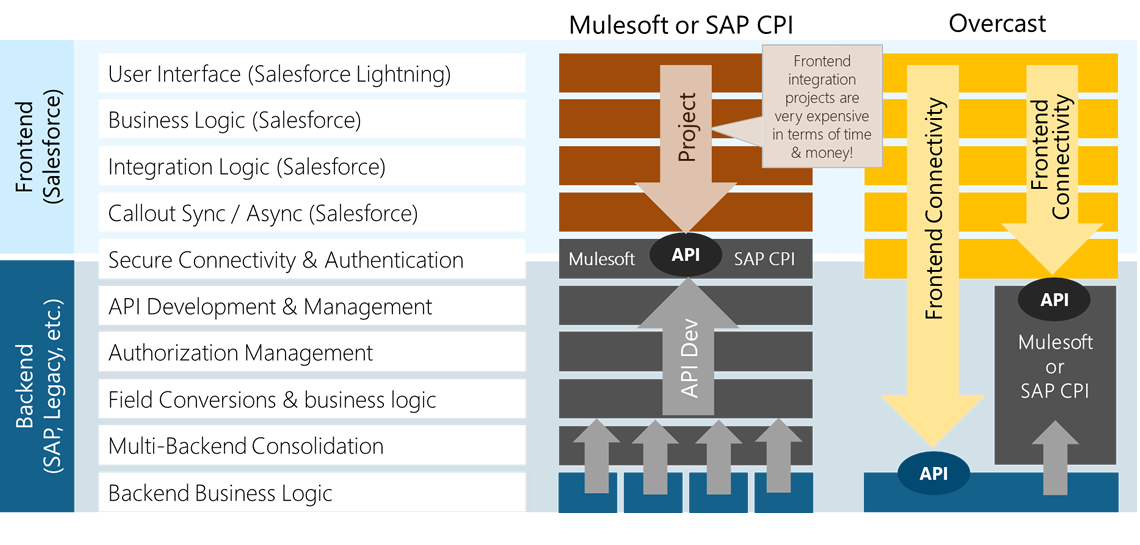
Our Overcast Integration App allows for direct frontend connectivity with the API, bypassing the expense of many months and the high cost required for more traditional architecture and tools. An integration based solely on Mulesoft could stretch out over the course of 1-2 years, with added risks, such as major delays. Overcast is flexible enough to meet the needs for those using Mulesoft or SAP CPI, and to work with the existing structure that may be in place.
Overcast is installed into Salesforce and is able to directly consume backend APIs such as SAP BAPIs or web services, but can also optionally connect through Mulesoft or SAP CPI web services in solution architectures where Backend processes and data are already exposed through them. Overcast provides Salesforce application extensions complete with UI and frontend integration logic, and Mulesoft or SAP CPI unlocks dated backend applications and wraps them in a modern API layer that can be consumed by Overcast and integrated to Salesforce UIs and application logic through configurations, not code.